





Every season the same argument comes back. A player says he never misses training. You think he missed four sessions in a row. Nobody wrote anything down, so nobody can settle it.
Tracking attendance fixes that, and it does not need special software. It needs a few clear rules, one simple sheet and a two-minute routine. This guide shows how to set up all three, with a free template you can copy today.
Key takeaways
- There are two kinds of attendance: who said they are coming, and who actually came. You need both.
- Record a few fields only: date, session type, player, answer, result and a reason for absences.
- Write the rules down before the season: what counts as excused, how much notice is expected and how attendance relates to selection.
- Use the numbers to start conversations, not to punish people.
- A spreadsheet is enough for one stable squad. Move to a tool when chasing answers takes more time than coaching.
Two kinds of attendance
Most coaches track only one of them, and usually the wrong one.
| Before the session | After the session | |
|---|---|---|
| What it is | Who said they are coming | Who actually came |
| What it helps you do | Plan the session, split groups, find a replacement | Review the season, be fair about selection |
| When you collect it | Days before, with a reminder | In the first five minutes |
| Typical problem | Silence, which looks like a yes | Nobody wrote it down |
The first one decides whether training works on the day. The second one decides whether your records can be trusted at the end of the season. A good setup keeps both without doubling your work.
What to record
Resist the urge to track everything. Each extra field is one more thing that will not get filled in on a cold Tuesday. Six fields are enough:
- Date. One row per session.
- Session type. Training, match, friendly, extra session. Keep them separate.
- Player. One column per player or one row per player, whichever you prefer.
- Answer before. Yes, no or no reply.
- Result. Present, absent, excused, late or injured.
- Reason, only for absences. A few words are enough.
Anything else, such as minutes played or fitness scores, belongs in a different sheet.
A free sports team attendance template
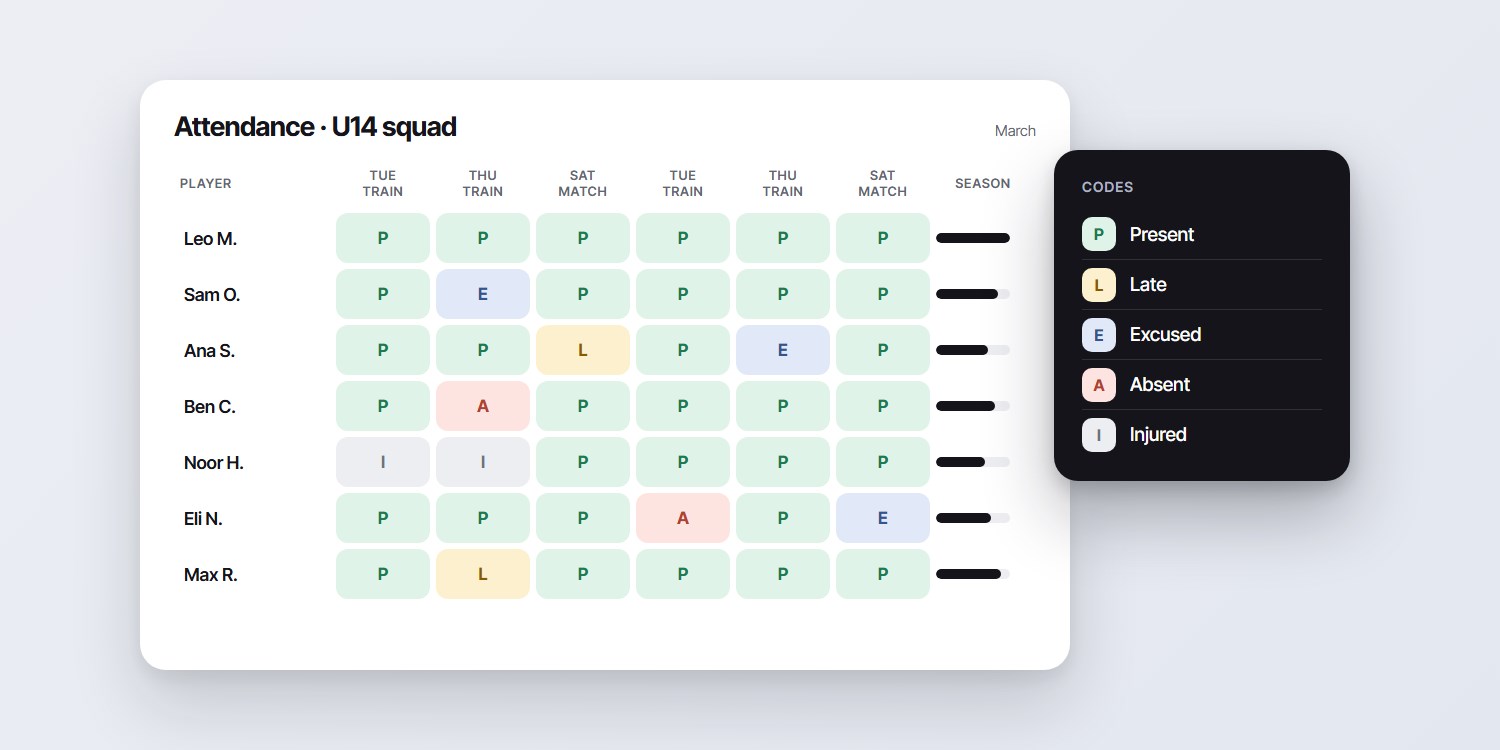
Copy this layout into Google Sheets or Excel. Players go down the side, sessions go across the top.
| Player | Tue 5 Mar Training | Thu 7 Mar Training | Sat 9 Mar Match | Present | Rate |
|---|---|---|---|---|---|
| Player A | P | P | P | 3 | 100% |
| Player B | P | E | P | 2 | 67% |
| Player C | A | P | L | 1 | 33% |
| Player D | P | P | I | 2 | 67% |
The example uses made-up players and numbers only to show the layout.
The codes
- P: present for the whole session.
- L: late or left early. Decide in advance if this counts as present.
- E: excused. The player told you in time and had a reason you accept.
- I: injured. Kept apart from absences so it does not count against anyone.
- A: absent without notice.
The formulas
In the "Present" column, count the P marks in that row, for example =COUNTIF(B2:D2,"P"). For the rate, divide by the number of sessions the player was expected at. If you do not count excused or injured sessions against a player, subtract them first: =COUNTIF(B2:D2,"P")/(COLUMNS(B2:D2)-COUNTIF(B2:D2,"E")-COUNTIF(B2:D2,"I")).
Pick one definition of "rate" at the start of the season and keep it. Changing it halfway makes the numbers meaningless.
Rules that keep tracking fair
Numbers without rules start arguments. Write these down and share them once, at the start of the season, with players and, for youth teams, their parents.
- What counts as excused. Illness, school, family, work. Give a few examples.
- How much notice you expect. A time that people can keep, such as "by midday on the day before".
- Match day is stricter. A last-minute drop-out hurts a match more than a training.
- Lateness. Say how late is too late.
- Injury and illness. Recorded, but not held against the player.
- The link to selection. If attendance matters for who plays, say so, and say how much. Never let it be a surprise.
For youth sport, check your club's or governing body's own rules on attendance and communication with parents, and follow them.
Collect answers before the session
The "before" column is the one that changes your evening. If you know on Monday that six players are out, you change the session. If you learn it at the pitch, you improvise.
- Ask each player directly, not the group. A group message creates no individual answer.
- Ask on a fixed day, for example two days before, and remind the silent ones the day before.
- Make the answer a single tap or a one-word reply. A reply that needs a sentence gets postponed.
- Write "no reply" as its own answer. It is information too.
We covered why group chats fail at this in why a WhatsApp group is not a scheduling tool.
Record it on the day
Recording is a habit, and habits need to be small. A routine that works for many coaches:
- Keep the sheet on your phone, in the same place every time.
- Mark attendance in the first five minutes, while players warm up.
- If you coach alone, give the job to an assistant, a captain or a parent volunteer.
- Add a reason for absences the same day, while you remember it.
Two minutes at the start save an evening of reconstruction at the end of the month.
What to do with the numbers
A sheet nobody reads is wasted effort. Look at it at fixed moments:
- Monthly. Look for patterns. Does one training night always have fewer players? Does a certain player miss every match?
- At a threshold you set in advance. For example, a quiet conversation after three absences without notice. The conversation, not a penalty, is the point.
- Before selection. Check the record, then also check the reasons.
- End of season. Reward consistency in a way your team values.
If many players miss the same session, the problem may be the session time, not the players. See what to measure after every event for more on reading the numbers.
When a spreadsheet stops being enough
A spreadsheet is a fine attendance tracker for one squad you see every week. It starts to creak when:
- You spend more time chasing answers than coaching.
- You coach, or your club runs, several squads.
- Answers come in through different chats and you copy them over by hand.
- Training and match days need different groups of players.
Planify is built for the "before" side. It sends each player or parent an official WhatsApp Business message for the session, with a confirm and a decline button. No player app is needed. You see who confirmed, who declined and who is still pending, by name, before you leave. Training and matches are separate events, and each squad can have its own coach under one club account.
It does not replace a team chat, payments or a league website. And players or parents need WhatsApp and a phone number on file. Full details are on the sports team scheduling and attendance page, and plans are on the pricing page.
Read next: what to do when someone cancels at the last minute.
FAQ
How do you track attendance for a sports team?
Record two things for every session: who said they are coming before, and who actually came. A simple sheet with one row per player, one column per session and a few codes for present, absent, excused, late and injured is enough for one squad.
What should a sports attendance sheet include?
The date, the session type, the player, the answer before the session, the result and a short reason for any absence. Keep training and match days separate.
How do you calculate an attendance rate?
Divide the sessions a player attended by the sessions they were expected at. Decide at the start of the season whether excused and injured sessions count against the player, and keep that definition for the whole season.
Should attendance affect team selection?
That is your call as a coach, but be open about it. Tell players at the start of the season whether attendance matters for selection and how much, and look at the reasons for absences, not only the numbers.
When should I move from a spreadsheet to attendance software?
When chasing answers takes more time than coaching, when you run several squads, or when answers arrive through different chats and you copy them over by hand. Until then, a spreadsheet is fine.