





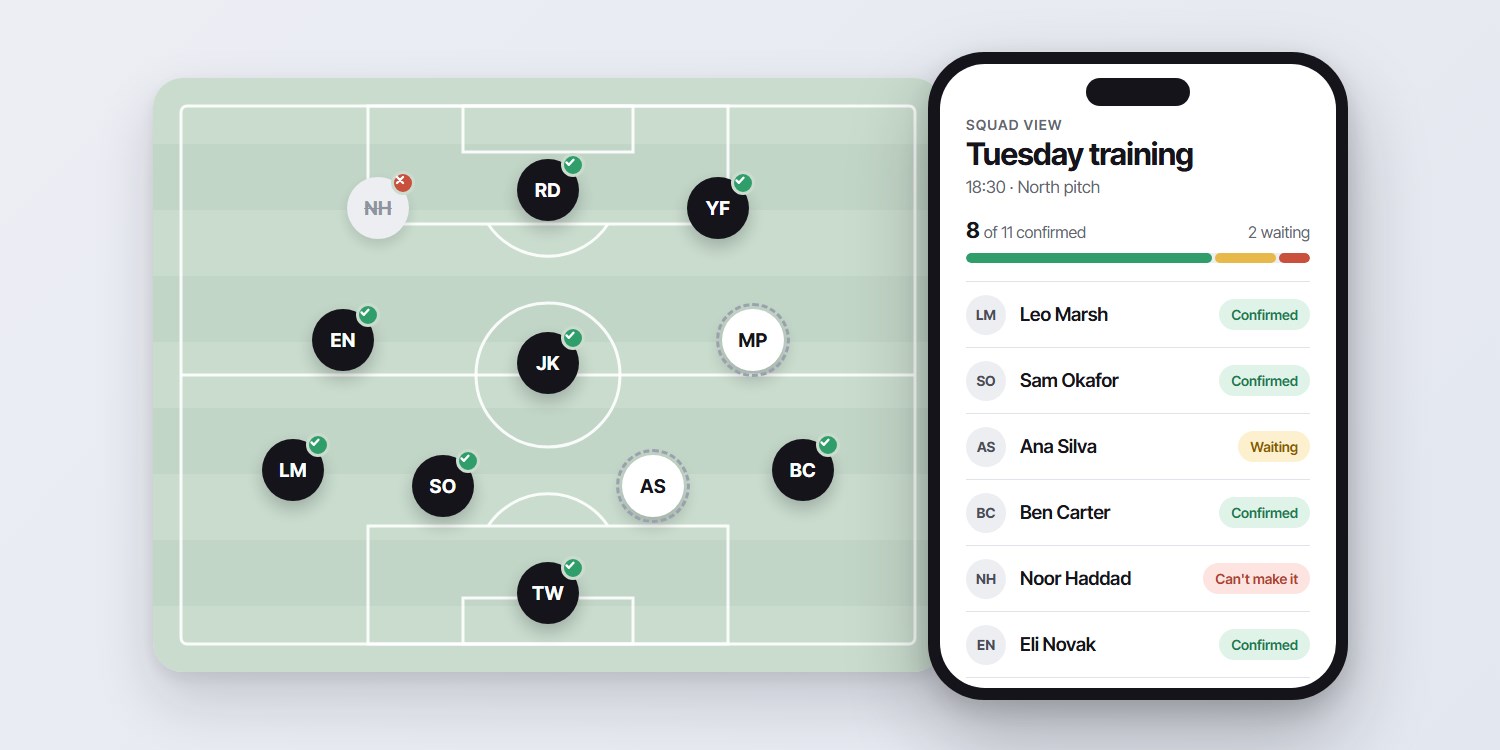
Training starts at six. At 5:40 you still do not know whether you have eleven players or six.
That is the problem an attendance app should solve. Not a record of who came last month, but an answer to one question before you leave the house: who is coming today?
This guide compares the main ways coaches handle attendance: group chat polls, spreadsheets, team apps, forms and WhatsApp confirmations. It shows what each one is good at, where it breaks and which kind of team it fits.
Key takeaways
- A good attendance app for coaches answers one question before the session: who is coming?
- A poll in the group chat is not attendance. It cannot tell "no" from "has not seen it".
- Team apps work well when every player or parent installs and checks them. That is the usual weak spot.
- WhatsApp confirmations skip the install: each player gets a message and taps yes or no.
- Choose by team type. Youth squads, adult amateurs and multi-team clubs need different things.
What a coach needs from an attendance app
Most attendance tools are built around recording. Coaches mostly need planning. The difference decides which tool feels useful and which one you stop opening after three weeks.
Before you compare anything, check it against this list:
- An individual answer from every player. A reaction in a group is not an answer.
- A live count, by name, before the session. Who said yes, who said no, who is silent.
- Training and match day kept apart. Someone can make Tuesday and miss Saturday.
- Reminders for the silent. You should not be the one sending them.
- A way to fill a spot. When someone cancels, you need a replacement quickly.
- Nothing new for players to learn. Every extra step lowers the number of answers.
Tracking who attended after the session is useful for statistics and for fair selection. It is a second job. If you want that side too, see what to measure after every event.
Six ways coaches track attendance
Here is how the common options compare on what matters before the session.
| Method | Individual yes or no | Players install an app | Live count | Effort for the coach |
|---|---|---|---|---|
| Group chat poll | No | No | Partial | Low, but unreliable |
| Spreadsheet or paper register | Only if you collect it | No | By hand | High every week |
| Team app | Yes, if they use it | Yes | Yes | Low once adopted |
| Club management platform | Yes | Usually | Yes | Medium to set up |
| Online form | Yes | No, a link | Partial | Medium |
| WhatsApp confirmation | Yes | No | Yes | Low |
1. A poll in the group chat
Free and instant. You post a poll, players tap, you read the result. The problem is the people who never tap. A poll shows who voted, not who is coming. We looked at this in detail in why a WhatsApp group is not a scheduling tool.
2. A spreadsheet or paper register
Fine for a small, stable squad where you see everyone every week. It breaks when you have to chase answers and type them in. It records attendance well and predicts it badly. More on the trade-off in spreadsheet versus software.
3. A dedicated team app
Apps such as Spond, TeamSnap and SportsEngine are built for exactly this. You create an event, invite the squad, and see who is attending, who is not and who has not replied. Most add reminders, calendars and more. Details and prices change, so check each one's current page.
4. A club management platform
Larger platforms cover registration, payments, fixtures and communication, with attendance as one part. They suit leagues and big clubs. For a coach who only wants a head count, they can be more than the job needs.
5. An online form
A form per session gives clean individual answers and costs nothing. The cost is that you send the link, remind people to open it and then read the results. It scales poorly past one team.
6. WhatsApp confirmations
Instead of asking the group, a tool messages each player directly on WhatsApp with a confirm or decline button. The answer is individual, and nobody installs anything. This is what Planify does, and it is the option the rest of this guide looks at more closely.
What team apps do well
They are a real answer, and for many teams the right one. Team apps usually bring a lot more than attendance:
- A shared calendar, so players see the season in one place.
- Reminders to people who have not answered.
- Team chat, so the conversation lives next to the schedule.
- Often fee collection, photos and fixtures.
If your players already live in the app and parents check it, you may not need anything else.
Where team apps struggle for coaches
The weak point is rarely the software. It is adoption.
- Someone has to install it. A new player, a new parent or a player who changed phones means another setup step.
- Another app to check. Players and parents already have chats, school apps and email. A notification can easily go unseen.
- Uneven use. If eight of fourteen players use the app, you are back to chasing the other six in the group chat.
That is the gap WhatsApp confirmations aim at. Most people already have WhatsApp open all day.
How WhatsApp confirmation works in Planify
Planify is team scheduling software that sends official WhatsApp Business messages. For a squad it works like this:
- You create the session. Squad, position if you use them, date, time and location. Training and matches are separate events, and recurring training reuses last week's structure.
- Planify messages each player. The message carries the session type, date, time and location, with a confirm and a decline button. It is sent on the club's timezone.
- You see the squad. A live view shows who confirmed, who declined and who is still pending, by name, before you leave.
A few details that matter to coaches:
- Attendance is per session. A yes for Tuesday does not become a yes for Saturday.
- Cover for an open position. If a player cancels, teammates who play that position can be asked to step in. People who already confirmed stay confirmed.
- Several teams, one club account. Each squad can be its own department with its own coach. The club owner keeps billing.
- Youth squads. Confirmations go to the registered contact for the player, which is often a parent.
You can see the full sports workflow on the sports team scheduling and attendance page.
What it does not do
Be clear about the limits before you choose it.
- Players or their parents need WhatsApp and a phone number on file.
- It is not a team chat, a payments tool or a league website. It handles scheduling and confirmation.
- Messages are counted by plan, so very large squads need a larger plan.
Our own numbers are modest: about 21 active members and a 64% confirmation rate. Treat that as a data point, not a promise for your club.
Which option fits which team
- Youth squads. Parents decide. If most parents will install and check an app, a team app works. If they live in WhatsApp, a confirmation message reaches them where they already are.
- Adult amateur teams. Players have their own phones and mixed habits. A group poll works until it does not. Move to individual confirmations when attendance becomes the weekly argument.
- Academies and multi-team clubs. You need per-squad coaches and one view across teams. A club platform or a tool with departments fits better than separate chats.
- School or university clubs. Turnover is high every term. Anything players must install will lose people. Confirmation through a messaging app they already use loses fewer.
- Small stable squads. A spreadsheet or a simple poll may be enough. Do not add software you do not need.
How to choose: seven questions
- Will every player, or every parent, actually install and open the app?
- Do you need team chat, payments or fixtures in the same place, or only a head count?
- Do you coach one squad or several?
- Can you separate training from match day?
- Does it remind the silent players without you doing it?
- Can you fill a spot when someone cancels, without reshuffling everyone?
- What does it cost at your squad size, today and next season?
If the first answer is "not everyone", favour a tool that does not need an install. If the second is "we need all of it", a team app or club platform fits better.
Set up attendance in 30 minutes
Whatever tool you pick, the setup is the same shape. Do it once and it carries the season.
- Collect one contact per player. For youth, use the parent's number.
- Create the recurring training slot once, with time and location.
- Add match days as separate events, with call time.
- Choose when to ask: a few days before, plus one reminder the day before.
- Tell the squad once how it will work, and then keep to it.
- Open the live count before every session and decide your plan from it.
For what to do when a player drops out late, see the last-minute cancellation recovery plan.
What it costs
Prices change, and other tools have free tiers with limits, so check each vendor's own page. For Planify, plans are in euros:
- Free: 1 department, up to 10 members, 30 messages a month.
- Team: €19.99 a month. Up to 3 departments, up to 35 members, 200 messages a month.
- Lead: €49.99 a month. Unlimited departments, up to 100 members, 600 messages a month.
The free plan is enough to try it with one small squad. Current numbers are always on the pricing page.
Read next: open call versus direct assignment, for when you need to fill places rather than assign them.
FAQ
What is the best attendance app for coaches?
It depends on your players. If they and their parents will install and check a team app, a dedicated team app is a good fit. If you cannot rely on that, a tool that confirms attendance through WhatsApp avoids the install. For a very small, stable squad, a spreadsheet can be enough.
Do players need to install an app to confirm attendance?
With a team app, yes. With Planify, no. Players answer on WhatsApp, so they only need WhatsApp and a phone number on file.
Can I track attendance for both training and matches?
Yes. Treat them as separate events, so that a yes for training does not carry over to match day. Attendance is then recorded per session.
How early should players confirm?
There is no single rule. Many coaches ask a few days ahead and remind the day before. Choose a timing your squad can keep and use the same one every week.
Is a WhatsApp group enough for attendance?
It is good for conversation and weak for counting. A group message creates no individual answer, so you cannot tell who has seen it. Individual confirmations give you a count you can plan from.
How much does Planify cost for a sports team?
Free covers 1 department, up to 10 members and 30 messages a month. Team is €19.99 a month for up to 3 departments, 35 members and 200 messages. Lead is €49.99 a month for unlimited departments, up to 100 members and 600 messages. See the pricing page for current plans.